> ## Documentation Index
> Fetch the complete documentation index at: https://docs.thesys.dev/llms.txt
> Use this file to discover all available pages before exploring further.

# Implementing Custom Components

> Provide your own components for the C1 API to render

## Introduction

Custom components provide a flexible and highly customizable way to introduce your own React components for the C1 API to use in its responses.
Custom components unlock a lot of tailor-made interfaces that your application might require, and it can now work within C1.

| Package               | Minimum version |
| :-------------------- | :-------------- |
| `@crayonai/react-ui`  | `0.8.31`        |
| `@thesysai/genui-sdk` | `0.6.34`        |
| `C1-Version`          | `v-20250915`    |

To illustrate the usefulness of custom components, imagine a flight booking service uses the C1 API to enable generative UI for its users.
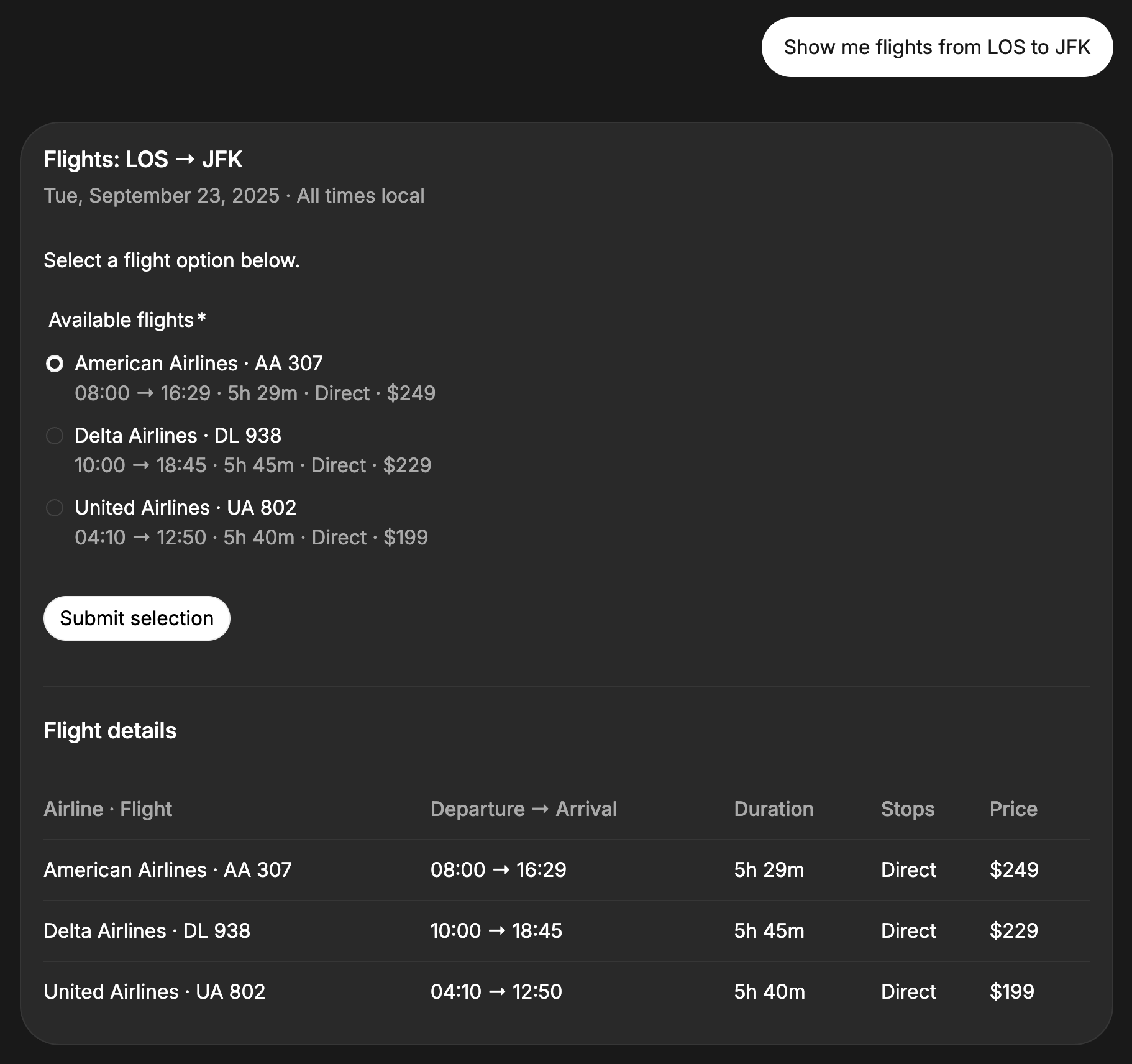
The user has asked for LOS to JFK flights on September 23, 2025. With the existing C1 components, the information is presented to the user in a C1 Form for selection.

<Frame>
  <img src="https://mintcdn.com/thesys/3DUVqK628WbZ1Rok/guides/custom-components-assets/C1-generation.png?fit=max&auto=format&n=3DUVqK628WbZ1Rok&q=85&s=0e6e68974d7296112047f11774a8d50c" alt="Callout Example" width="1822" height="1712" data-path="guides/custom-components-assets/C1-generation.png" />
</Frame>

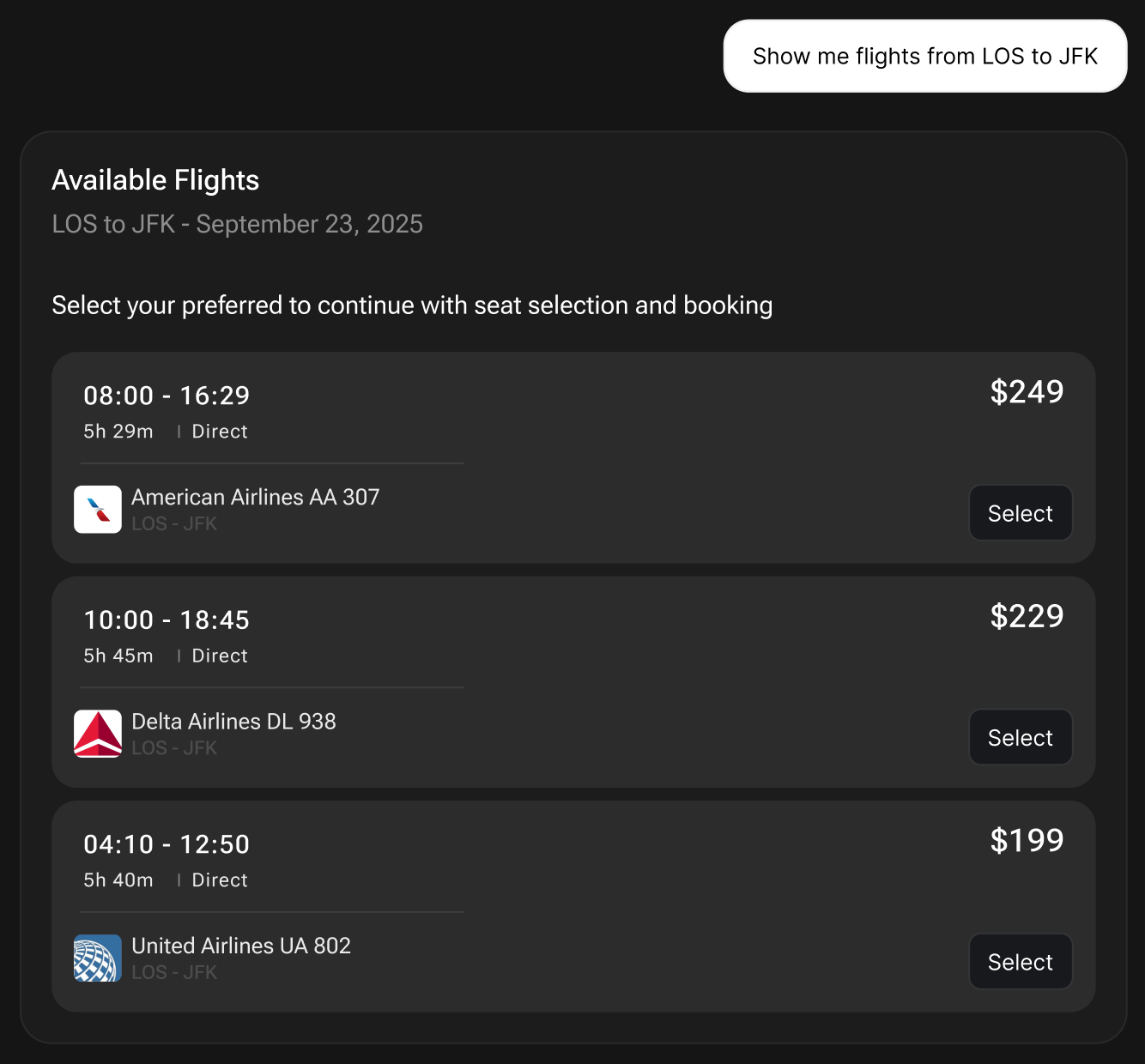
With custom React components, the application can customize how the flight list looks, and have internal states for flight cards and functionality that they want to enable for the user, such as API fetching, interactions, among others.
<Frame>
  <img src="https://mintcdn.com/thesys/3DUVqK628WbZ1Rok/guides/custom-components-assets/custom-generation.png?fit=max&auto=format&n=3DUVqK628WbZ1Rok&q=85&s=49739aaddac0647a9cd2ee14ca9bbd84" alt="Callout Example" width="1334" height="1240" data-path="guides/custom-components-assets/custom-generation.png" />
</Frame>

## Integrate Custom Components

The following is a step-by-step guide on how to plug in your React components, along with instructions for C1 to use them in its generations.

<Info>
  For a working example, kindly visit [Thesys C1 examples on
  github](https://github.com/thesysdev/examples/tree/main/c1-custom-component)
</Info>

<Steps>
  <Step title="Define your React components">
    Use `@thesysai/genui-sdk`'s `useOnAction` to get an `onAction` callback.
    This callback is used to handle user interactions with components.
    In addition to `onAction`, each component can have its own internal functions for `useC1State` management, API fetching, etc.

    Use `useC1State` to maintain per-response state of the component within C1.

    Refer to [Custom Components Specification](#custom-component-specification) below for more details.

    ```ts src/app/components.tsx theme={null}
    import { useOnAction, useC1State } from "@thesysai/genui-sdk";

    export const FlightList = ({ flights }: { flights: Flight[] }) => {
      const onAction = useOnAction();

      // State management to manage component's internal state
      const { getValue, setValue } = useC1State("FlightList")

      return (
        <div>
          <h3>Available Flights</h3>
          ...
          {flights.map((flight) => (
            <FlightCard
              // onSelect trigger for the FlightCard
              onSelect={() =>
                onAction(
                  "Select Flight", // Human-friendly message
                  `User selected flight ${flight.flightNumber}` // LLM-specific message with user context
                )
              }
              ...
            />
          ))}
        </div>
      );
    };
    ```
  </Step>

  <Step title="Define the component prop schema">
    In order to inform C1 about the expected props for your component, start by defining a `Zod`-based schema.

    ```ts src/app/api/chat/route.ts theme={null}
    import { z } from "zod";

    // Schema of a flight
    const flightSchema = z
      .object({
        flightNumber: z.string(),
        departure: z.string(),
        arrival: z.string(),
        layover: z.string().optional(),
        ...
      })
      .describe(
        "Represents a single flight option including schedule, price, and stops."
      );

    // Schema of the flight list component props
    const FlightListSchema = z
      .object({
        flights: z.array(flightSchema),
      })
      // Always include descriptive text for the LLM to understand the component
      .describe(
        "Displays a list of available flights. Renders rich cards with airline, route, times, stops, and price. Includes a clear 'Select' action for each item."
      );
    ```
  </Step>

  <Step title="Pass the schema to the C1 API">
    Using the schema described above, convert them as `JSON` schemas and send it as a part of your C1 API payload.

    <Warning>
      Since we used the name `FlightList` for the React component in the frontend,
      the `CUSTOM_COMPONENT_SCHEMAS` must have the same key, `FlightList`.
    </Warning>

    <CodeGroup dropdown>
      ```ts src/app/api/chat/route.ts theme={null}
      // Schema to be passed to the C1 API
      const CUSTOM_COMPONENT_SCHEMAS = {
        FlightList: zodToJsonSchema(FlightListSchema),
        ... // other custom components
      };

      export async function POST(req: NextRequest) {
        ...
        const client = new OpenAI({
          baseURL: "https://api.thesys.dev/v1/embed/",
          apiKey: process.env.THESYS_API_KEY,
        });

        const llmStream = client.chat.completions.runTools({
          ...
          model: "c1/anthropic/claude-sonnet-4/v-20250915",
          // Pass custom component schema
          metadata: {
            thesys: JSON.stringify({
              c1_custom_components: CUSTOM_COMPONENT_SCHEMAS,
            }),
          },
        });

        ...
      }
      ```

      ```python theme={null}
      import json, jsonref
      from typing import List, Optional
      from pydantic import BaseModel

      client = openai.OpenAI(
          api_key=os.environ.get("THESYS_API_KEY"),
          base_url="https://api.thesys.dev/v1/embed",
      )

      class Flight(BaseModel):
          """Represents a single flight option including schedule, price, and stops."""
          flightNumber: str
          departure: str
          arrival: str
          layover: Optional[str] = None

      class FlightList(BaseModel):
          """Displays a list of available flights. Renders rich cards with airline, route, times, stops, and price. Includes a clear 'Select' action for each item."""
          flights: List[Flight]


      def generate_schema(model: BaseModel):
        schema = model.model_json_schema()
        schema = jsonref.replace_refs(schema, proxies=False) # dereference $refs and $defs
        schema.pop("$defs", None) # remove $defs
        schema.pop("$ref", None) # remove $refs
        return schema

      # Construct the metadata payload
      thesys_metadata = {
          "c1_custom_components": {
              "FlightList": generate_schema(FlightList)
          }
      }

      response = client.chat.completions.create(
          model="c1/anthropic/claude-sonnet-4/v-20250930",
          messages=messages,
          metadata={"thesys": json.dumps(thesys_metadata)},
      )


      ```
    </CodeGroup>
  </Step>

  <Step title="Pass the React components to GenUI SDK for rendering">
    Custom React components can be used by the `<C1Chat>` and `<C1Component>` components.

    #### C1Chat

    ```ts src/app/page.tsx theme={null}
    import { C1Chat } from "@thesysai/genui-sdk";
    import { FlightList } from "./components";

    export default function Home() {
      return (
        <C1Chat
          apiUrl="/api/chat"
          customizeC1={{
            customComponents: { FlightList },
          }}
        />
      );
    }
    ```

    #### C1Component

    ```ts theme={null}
    ...
    import { C1Component } from "@thesysai/genui-sdk";
    import { FlightList } from "./components";

    <C1Component
      customComponents={{ FlightList }}
      ...
    />;
    ```
  </Step>
</Steps>

## Custom Component Specification

### useOnAction

Returns a callback to record a user action with both a user-facing label and
an LLM-oriented description.

**Returns**

<ResponseField name="callback" type="(humanFriendlyMessage: string, llmFriendlyMessage: string) => void">
  Callback to dispatch the action.
</ResponseField>

**Callback Arguments**

<ParamField path="humanFriendlyMessage" type="string" required>
  Visible to the user; concise, human-readable label for the action. Used to
  give feedback to the user about their action.

  Eg: When submitting a form for a trip planner, the human-friendly message can be "Submit response".
</ParamField>

<ParamField path="llmFriendlyMessage" type="string" required>
  Sent to the LLM; richer context describing what happened. Used to send the
  contents of the user action to the LLM.

  Eg: When submitting a form for a trip planner, the LLM-friendly message can be "User selected `${form.destination}`, from `${form.startDate}` to `${form.endDate}`".
</ParamField>

<Info>
  Refer to [Interactivity](/guides/interactivity) for
  more details on `onAction`, and how `human-friendly` and `llm-friendly`
  messages work.
</Info>

### useC1State

Access a named piece of component state with getter and setter helpers.

**Arguments**

<ParamField path="name" type="string" required>
  The state field key you wish to read/write.
</ParamField>

**Returns**

<ResponseField name="getValue" type="() => any">
  Function that returns the current state for the given `name`.
</ResponseField>

<ResponseField name="setValue" type="(value: any) => void">
  Updates the field and triggers any save/persist callbacks.
</ResponseField>