> ## Documentation Index
> Fetch the complete documentation index at: https://docs.thesys.dev/llms.txt
> Use this file to discover all available pages before exploring further.
# Troubleshooting
> Commonly encountered errors and their solutions
## Generations don't look like the demos
Make sure that you are installing the CSS library and the correct fonts.
```tsx page.tsx theme={null}
import "@crayonai/react-ui/styles/index.css";
```
```css globals.css theme={null}
@import url('https://fonts.googleapis.com/css2?family=Inter:ital,opsz,wght@0,14..32,100..900;1,14..32,100..900&display=swap');
```
## Empty Agent Response
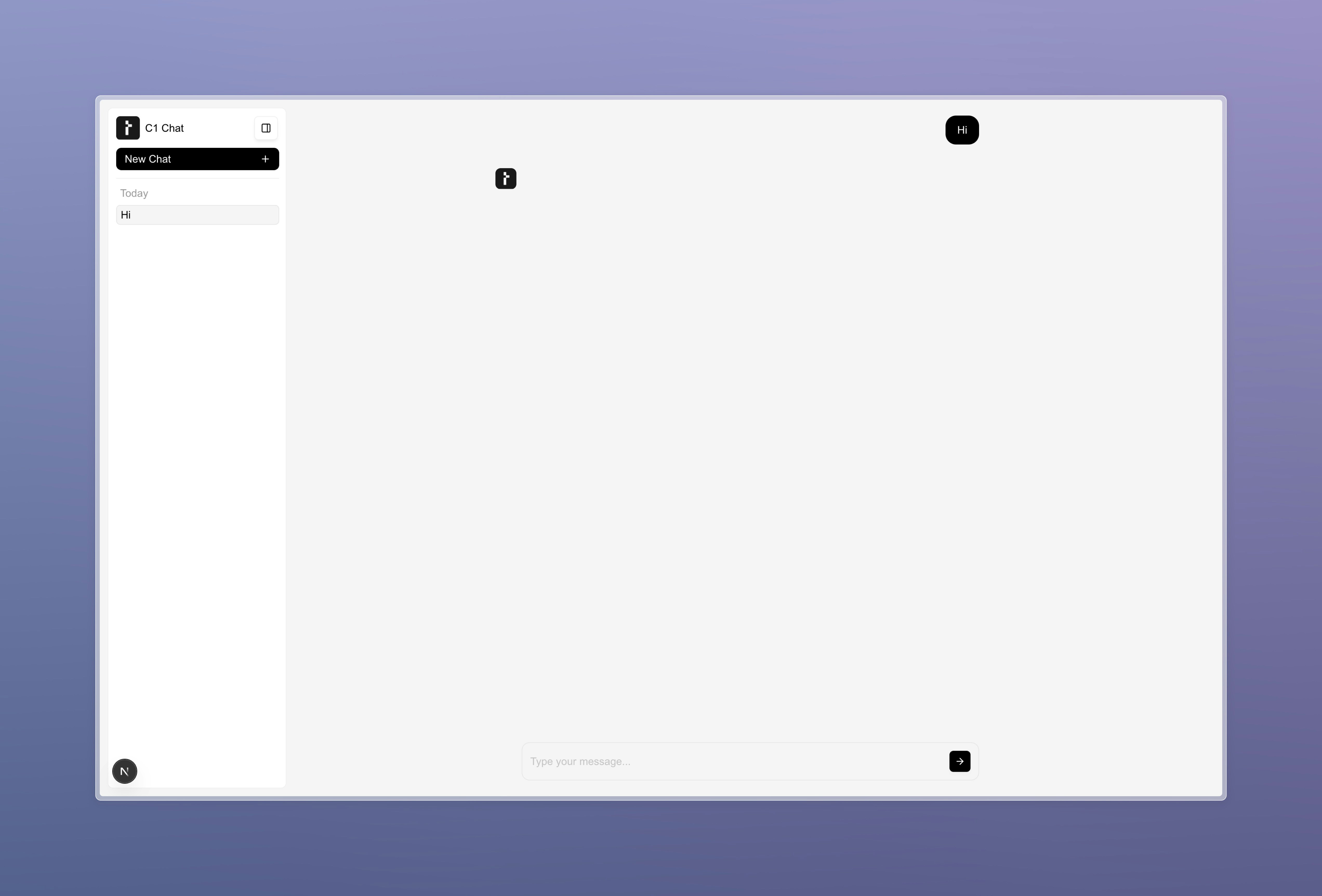 C1 renders an empty agent response as shown above when the component is unable to correctly parse the response content sent by the backend. Here's a checklist to
make sure you're not missing anything:
Check your network tab to ensure that the response streamed by your API follows the expected format. The C1 component expects an XML-formatted response with
the primary content wrapped in a `` tag. Here's an example of the expected format:
```xml theme={null}
```
### The `transformStream` function call
Make sure that the `transformStream` function call on your backend (if you're streaming the response) returns the correct part of the chunk:
```ts theme={null}
transformStream(llmStream, (chunk) => {
return chunk.choices[0]?.delta?.content;
});
```
### The `processMessage` function
If you're using a custom `threadManager` created using a `useThreadManager` hook, make sure that the `processMessage` function is returning the correct
object. The `processMessage` function should directly return the response from your backend, which has already transformed the stream into the correct format:
```ts theme={null}
processMessage: async ({ messages }) => {
const latestMessage = messages[messages.length - 1];
const response = await fetch("/api/chat", {
method: "POST",
body: JSON.stringify({
prompt: latestMessage,
threadId: threadListManager.selectedThreadId,
responseId: crypto.randomUUID(),
}),
});
return response;
};
```
Ensure that the LLM model you're using on the backend, the GenUI SDK version, and the Crayon packages are compatible with each other. Refer to the
[Compatibility Matrix](/api-reference/models-and-compatibility) for more information.
## System prompt not being followed
If your model is not following the system prompt, there are a few things you can try:
* **Try rephrasing the prompt:** Try to rephrase the prompt in a different way, and emphasize the instructions that the model was previously not following.
* **Try meta prompting:** Meta prompting is a technique where you use an LLM to generate or refine a prompt to be fed into another LLM. This can help improve accuracy in many cases.
* **Try using a different model:** Try using another stable model from [this list](/api-reference/models-and-compatibility).
## Still having issues?
Feel free to send a message in the #help channel on [Discord](https://discord.gg/Pbv5PsqUSv) and someone from our team will get back to you.
C1 renders an empty agent response as shown above when the component is unable to correctly parse the response content sent by the backend. Here's a checklist to
make sure you're not missing anything:
Check your network tab to ensure that the response streamed by your API follows the expected format. The C1 component expects an XML-formatted response with
the primary content wrapped in a `` tag. Here's an example of the expected format:
```xml theme={null}
```
### The `transformStream` function call
Make sure that the `transformStream` function call on your backend (if you're streaming the response) returns the correct part of the chunk:
```ts theme={null}
transformStream(llmStream, (chunk) => {
return chunk.choices[0]?.delta?.content;
});
```
### The `processMessage` function
If you're using a custom `threadManager` created using a `useThreadManager` hook, make sure that the `processMessage` function is returning the correct
object. The `processMessage` function should directly return the response from your backend, which has already transformed the stream into the correct format:
```ts theme={null}
processMessage: async ({ messages }) => {
const latestMessage = messages[messages.length - 1];
const response = await fetch("/api/chat", {
method: "POST",
body: JSON.stringify({
prompt: latestMessage,
threadId: threadListManager.selectedThreadId,
responseId: crypto.randomUUID(),
}),
});
return response;
};
```
Ensure that the LLM model you're using on the backend, the GenUI SDK version, and the Crayon packages are compatible with each other. Refer to the
[Compatibility Matrix](/api-reference/models-and-compatibility) for more information.
## System prompt not being followed
If your model is not following the system prompt, there are a few things you can try:
* **Try rephrasing the prompt:** Try to rephrase the prompt in a different way, and emphasize the instructions that the model was previously not following.
* **Try meta prompting:** Meta prompting is a technique where you use an LLM to generate or refine a prompt to be fed into another LLM. This can help improve accuracy in many cases.
* **Try using a different model:** Try using another stable model from [this list](/api-reference/models-and-compatibility).
## Still having issues?
Feel free to send a message in the #help channel on [Discord](https://discord.gg/Pbv5PsqUSv) and someone from our team will get back to you.