Use this file to discover all available pages before exploring further.
You can find the complete source code for this guide in the c1-custom-components example repository.
You might want to swap out certain components, such as the composer or sidebar, with your own to better match your design system. This can be done by destructuring and manually composing the C1Chat component and plugging in your own components where needed. Follow these steps to get started:
1
Destructure the C1Chat component
If you’ve followed the Quickstart guide, you should have a C1Chat component in your page.tsx file. You will need to replace that component with its constituent components.First, import ThemeProvider from @thesysai/genui-sdk, ChatProvider from @crayonai/react-core, and the following components from @crayonai/react-ui/Shell. Then, use them in your JSX code as follows:
For detailed information on how to create the threadManager and threadListManager, refer to this guide.
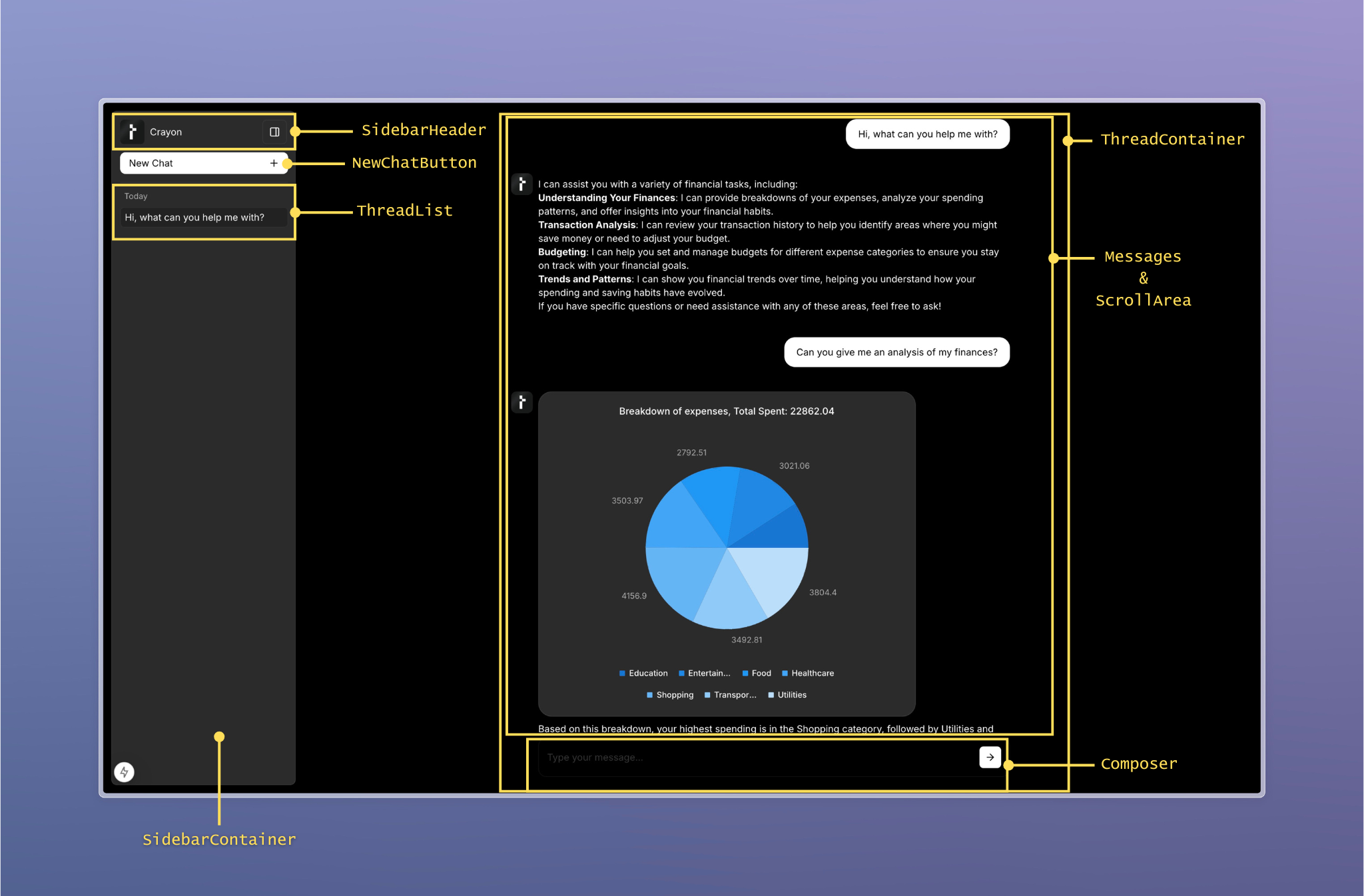
Here is an illustration of the composed UI that shows which components refer to which parts of the UI:
2
Build your own custom component
Next, build the custom component you would like to plug into the UI. For this example, let’s assume you want to replace the composer with a custom one. You can write the custom composer as follows:
That’s it! You’ve now replaced the default composer with your own custom one. You can do the same for the sidebar or any other component that you wish to replace.
Was this page helpful?
⌘I
Assistant
Responses are generated using AI and may contain mistakes.